Waymo Open Sim Agent Challenge (WOSAC) benchmark
We provide a re-implementation of the Waymo Open Sim Agent Challenge (WOSAC), which measures distributional realism of simulated trajectories compared to logged human trajectories. Our version preserves the original logic and metric weighting but uses PyTorch on GPU for the metrics computation, unlike the original TensorFlow CPU implementation. The exact speedup depends on the setup and hardware, but in practice this leads to a substantial speedup (around 30–100×). Evaluating 100 scenarios (32 rollouts + metrics computation) currently completes in under a minute.
Besides speed benefits, the code is also simplified to make it easier to understand and extend.
Note: In PufferDrive, agents are conditioned on a “goal” represented as a single (x, y) position, reflecting that drivers typically have a high-level destination in mind. Evaluating whether an agent matches human distributional properties can be decomposed into: (1) inferring a person’s intended direction from context (1 second in WOSAC) and (2) navigating toward that goal in a human-like manner. We focus on the second component, though the evaluation could be adapted to include behavior prediction as in the original WOSAC.
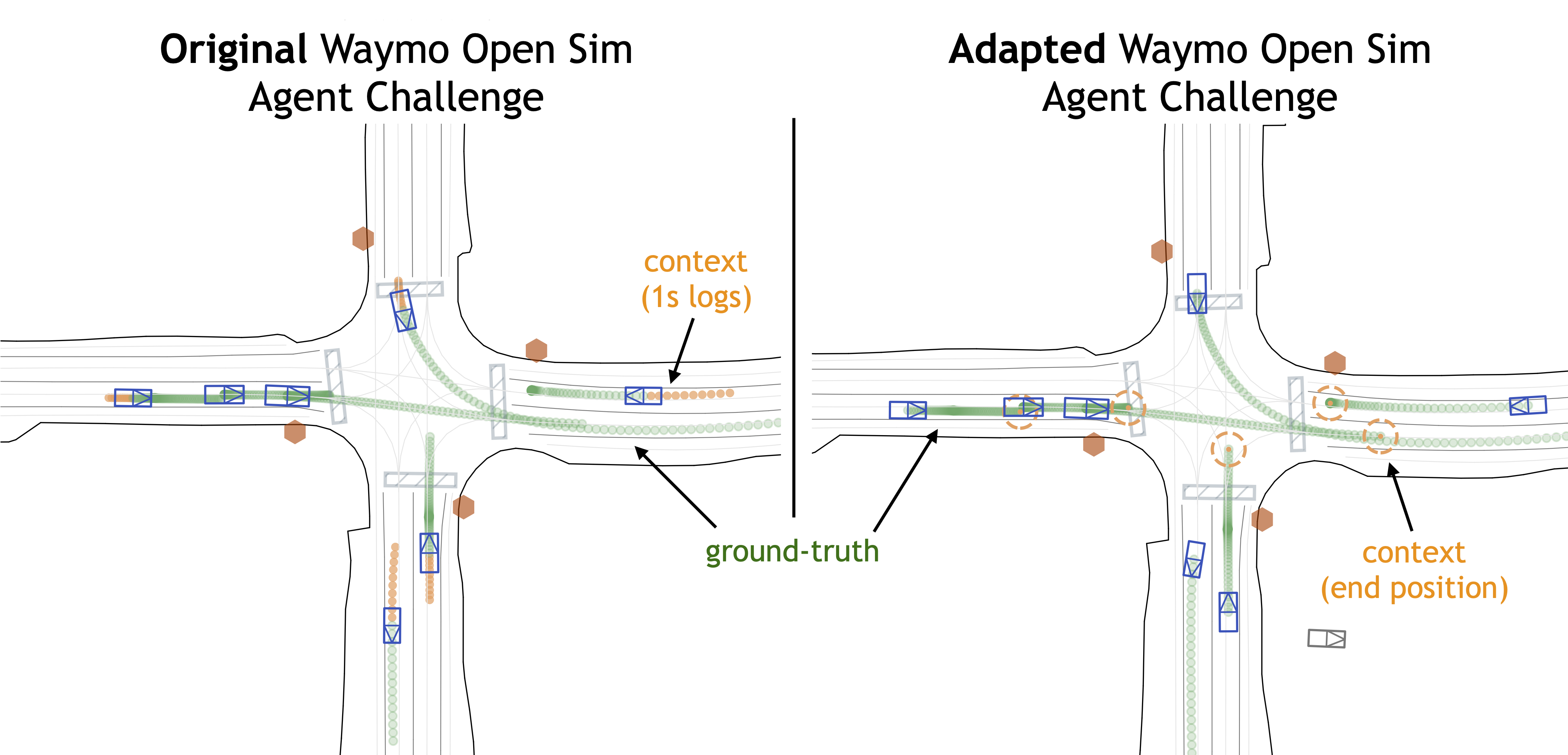
Illustration of WOSAC implementation in PufferDrive (RHS) vs. the original challenge (LHS).
Usage
Running a single evaluation from a checkpoint
The [eval] section in drive.ini contains all relevant configurations. To run the WOSAC eval once:
puffer eval puffer_drive --eval.wosac-realism-eval True --load-model-path <your-trained-policy>.pt
The default configs aim to emulate the WOSAC settings as closely as possible, but you can adjust them:
[eval]
map_dir = "resources/drive/binaries/validation" # Dataset to use
num_maps = 100  # Number of maps to run evaluation on. (It will always be the first num_maps maps of the map_dir)
wosac_num_rollouts = 32      # Number of policy rollouts per scene
wosac_init_steps = 10        # When to start the simulation
wosac_control_mode = "control_wosac"  # Control the tracks to predict
wosac_init_mode = "create_all_valid"  # Initialize from the tracks to predict
wosac_goal_behavior = 2      # Stop when reaching the goal
wosac_goal_radius = 2.0      # Can shrink goal radius for WOSAC evaluation
Log evals to W&B during training
During experimentation, logging key metrics directly to W&B avoids a post-training step. Evaluations can be enabled during training, with results logged under a separate eval/ section. The main configuration options:
[train]
checkpoint_interval = 500    # Set equal to eval_interval to use the latest checkpoint

[eval]
eval_interval = 500          # Run eval every N epochs
map_dir = "resources/drive/binaries/training"  # Dataset to use
num_maps = 20 # Number of maps to run evaluation on. (It will always be the first num_maps maps of the map_dir)
Baselines
We provide baselines on a small curated dataset from the WOMD validation set with perfect ground-truth (no collisions or off-road events from labeling mistakes).
| Method | Realism meta-score | Kinematic metrics | Interactive metrics | Map-based metrics | minADE | ADE |
|---|---|---|---|---|---|---|
| Ground-truth (UB) | 0.8179 | 0.6070 | 0.9590 | 0.8722 | 0 | 0 |
| Self-play RL agent | 0.6750 | 0.2798 | 0.7966 | 0.7811 | 10.8057 | 11.4108 |
| SMART-tiny-CLSFT | 0.7818 | 0.5200 | 0.8914 | 0.8378 | 1.1236 | 3.1231 |
| Random | 0.4459 | 0.0506 | 0.7843 | 0.4704 | 23.5936 | 25.0097 |
Table: WOSAC baselines in PufferDrive on 229 selected clean held-out validation scenarios.
- Random agent: Following the WOSAC 2023 paper, the random agent samples future trajectories by independently sampling (x, y, θ) at each timestep from a Gaussian distribution in the AV coordinate frame
(mu=1.0, sigma=0.1), producing uncorrelated random motion over the horizon of 80 steps. - Goal-conditioned self-play RL agent: An agent trained through self-play RL to reach the end point points (“goals”) without colliding or going off-road. Baseline can be reproduced using the default settings in the
drive.inifile with the Waymo dataset. We also open-source the weights of this policy, seepufferlib/resources/drive/puffer_drive_weights.binand.pt.
✏️ Download the dataset from Hugging Face to reproduce these results or benchmark your policy.
Evaluating trajectories
In this section, we describe how we evaluated SMART-tiny-CLSFT in PufferDrive and how you can use this to evaluate your own agent trajectories.
High-level idea
The WOSAC evaluation pipeline takes as input simulated trajectories (sim_trajectories) and ground-truth trajectories, computes summary statistics, and outputs scores based on these statistics (entry point to code here). If you already have simulated trajectories saved as a .pkl file—generated from the same dataset—you can directly use them to compute WOSAC scores.
Command
python pufferlib/ocean/benchmark/evaluate_imported_trajectories.py --simulated-file my_rollouts.pkl
Instructions
- Rollouts must be generated using the same dataset specified in the config file under
[eval] map_dir. The corresponding scenario IDs can be found in the.jsonfiles (thescenario_idfield). - If you have a predefined list of
scenario_ids, you can pass them to your dataloader to run inference only on those scenarios. - Save the inference outputs in a dictionary with the following fields:
x        : (num_agents, num_rollouts, 81)
y        : (num_agents, num_rollouts, 81)
z        : (num_agents, num_rollouts, 81)
heading  : (num_agents, num_rollouts, 81)
id       : (num_agents, num_rollouts, 81)
- Recompile the code with
MAX_AGENTS=256set indrive.h. - Finally, run:
python pufferlib/ocean/benchmark/evaluate_imported_trajectories.py --simulated-file my_rollouts.pkl